
Personalized PDFs for Shopify
Your customers write the message. Noteable puts it on the card.
Add fields like a recipient's name or a gift message to your product pages. Noteable places each answer on your own PDF design, ready to download from the order.
14-day free trial. Plans from $9/month, billed through Shopify.
Try it: type a name and watch the card update.
Product page

Birthday Box
$25.00
PDF on the order
Wishing you a very
Happy Birthday,
Emma!
How it works
Set up a template once. Print from the order.
Step 1
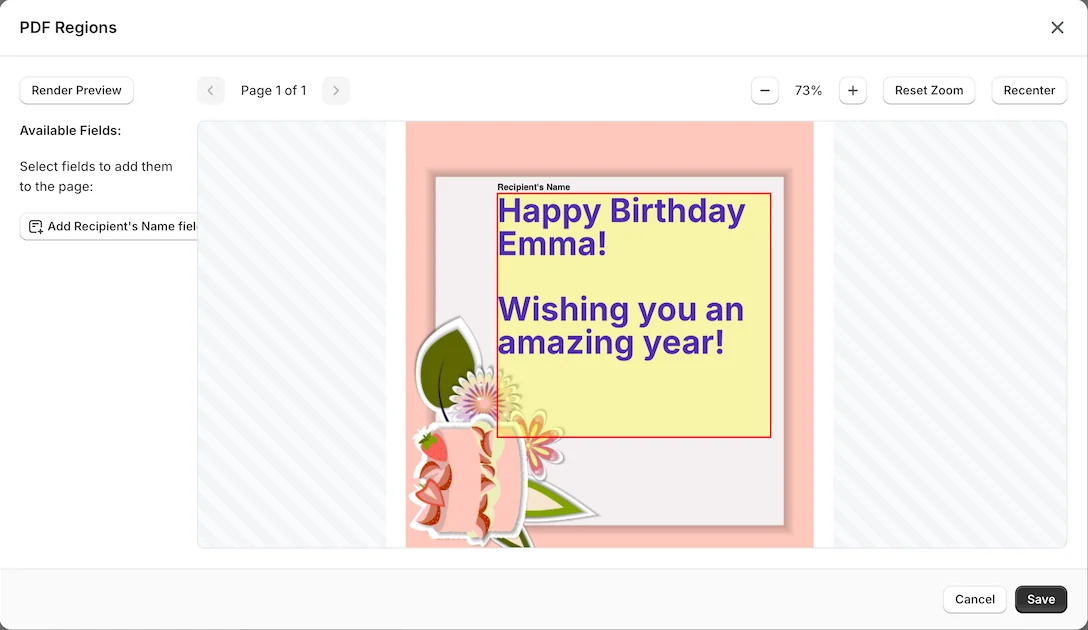
Upload your design
Start with a PDF you already use, like a greeting card or a certificate. Draw a box where each customer entry should go, then set the font, size, color, and alignment.
Step 2
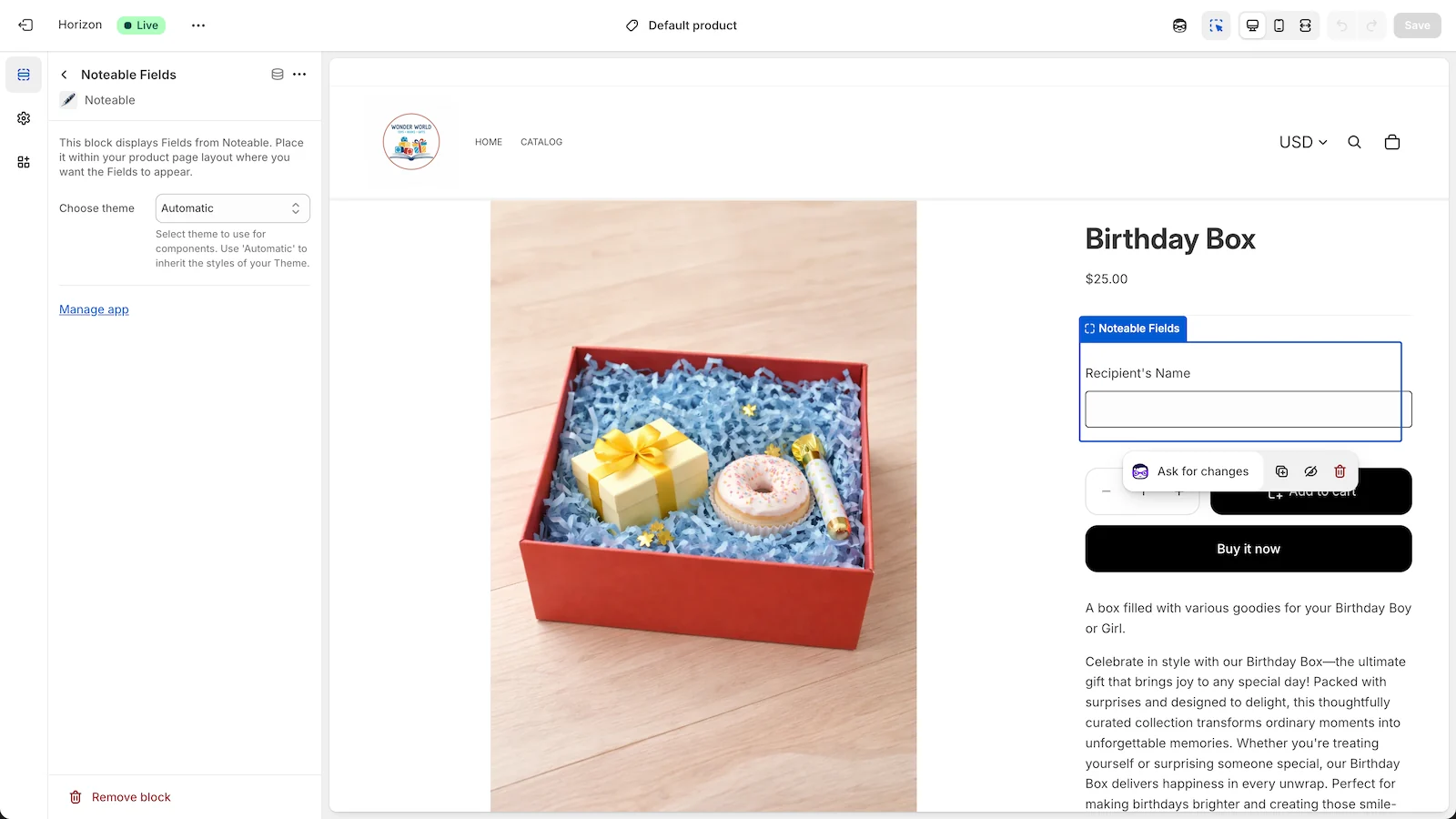
Collect details on the product page
Add the Noteable Fields block to your product template in the theme editor. Shoppers fill in the fields before they add the item to their cart.
Step 3
Download from the order
Open the order in your Shopify admin and download the finished PDF. Choose one file per item, one merged PDF, or a ZIP, then print it and pack it with the order.

What you can make with Noteable
- Birthday and greeting cards
- Thank-you notes
- Gift messages
- Certificates
- Personalized labels
Features
Control over the finished page
Set the details once in the template editor. Each PDF follows them.
Your own PDF
Upload your design as a PDF up to 10 MB. Multi-page documents work too.
20 font families
Choose from fonts like Playfair Display, Merriweather, and Poppins, with custom colors, bold, and italic.
Text that fits the box
Align text left, center, or right. Wrap long messages onto several lines, or trim them to fit.
Formatting built in
Format dates and numbers, change text case, or add fixed text around an entry, so “Emma” prints as “Happy birthday, Emma!”
Text, number, and date fields
Give each field a label, a placeholder, and help text so shoppers know what to enter.
Products or collections
Apply a template to specific products or whole collections. When several match, the one with the highest priority wins.
Preview with test values
Render a preview with sample entries to check the layout before shoppers see the fields.
Theme setup check
See which product templates in your theme have the Noteable Fields block, and which still need it.
Four languages
Use the app in English, French, German, or Spanish.
Pricing
Simple plans, billed through Shopify
Each plan starts with a 14-day free trial. Pay monthly, or pay yearly and save.
Starter
For small shops getting started
$9 / month
or $80 / year
- 1 PDF template
- 1 field per template
- 100 PDF renders per month
- Basic support
Growth
For active personalization
$19 / month
or $189 / year
- 3 PDF templates
- 3 fields per template
- 500 PDF renders per month
- Priority support
Pro
For high-volume stores
$39 / month
or $379 / year
- 10 PDF templates
- 5 fields per template
- 2,000 PDF renders per month
- Priority support
Prices in USD. Each PDF download from an order counts as one render.
FAQ
Frequently asked questions
Which themes does Noteable work with?
Noteable adds its fields with a theme app block, which works on Online Store 2.0 themes that use JSON product templates. The app checks your current theme and shows which product templates still need the block.
Where do shoppers enter their details?
On the product page, wherever you place the Noteable Fields block in the theme editor. The block can follow your theme's styles or use a light or dark look.
Where are the entries saved?
Each entry is saved on the order as a line item property, so it also shows in your Shopify admin.
How do I print the PDFs?
Open the order in your Shopify admin, choose More actions, then Noteable. Download one PDF per item, one merged PDF, or a ZIP, and print it on your own printer.
What counts as a render?
Each PDF download from an order counts as one render, including merged PDFs and ZIP files. Your plan sets how many renders you can use each month.
How does billing work?
Each plan starts with a 14-day free trial. After that, Shopify adds the charge to your store's bill, monthly or yearly.
Still have a question? Email support@getnoteable.com.
Put your customers' words on the page
Install Noteable from the Shopify App Store, and the guided setup walks you through your first template.
Start your free trial